Fauxto Labs brings together 17 image generation models, more than 20 video models, and a full audio suite alongside a set of guided creative studios — all accessible through a single platform with simple pay-as-you-go pricing. Whether you are a marketer building ad campaigns, a content creator scaling your output, or a designer prototyping ideas, this guide walks through every tool at your disposal and helps you choose the right model for every project.
One thing to be clear about up front: Fauxto Labs does not build or train any of these models. It is an aggregator. What you are paying for is unified access to the best work coming out of Google, OpenAI, Black Forest Labs, ByteDance, Alibaba, MiniMax, Kuaishou and others, with one interface, one credit balance, and the ability to pick a different model for every job instead of being locked into whatever one lab happens to be good at.
Below you will find detailed breakdowns of each tool category, credit costs, ideal use cases, and tips for getting the most out of every generation. All content you create includes full commercial rights — no subscriptions, no attribution requirements, no hidden fees.
Specialized Studios
Purpose-Built Creative Workflows
From storyboard creation to AI lipsync, music generation to UGC content — unlock professional-grade creative capabilities with our most powerful tools.
Photoshoots
Turn one reference photo into up to 9 professional variations
AI Editing
Context-aware editing with multi-image input
UGC Builder
Create TikTok-style product reviews with AI
Ad Creator
Let AI create the perfect advertisement from your photos
Kling Motion Control
Define exact camera paths and subject movements for cinematic video
TikTok Slideshow
Create scroll-stopping TikTok carousel slideshows with AI
AI Lipsync
Generate perfectly synced lip movements from images
AI Music
Generate original tracks with Stable Audio or Google Lyria 2
Image Generation
Image generation is the heart of Fauxto Labs. With 17 models to choose from, you can tackle anything from quick social media assets to premium commercial photography. Each model has a distinct personality: some excel at photorealism, others at illustration, and a few are purpose-built for niche tasks like text rendering or design systems. Every model shares the same controls — 11 aspect ratios (1:1, 4:3, 3:4, 3:2, 2:3, 16:9, 9:16, 21:9, 9:21, 2:1, 1:2, with the Nano Banana models the exception in not supporting 9:21) and 1 to 4 images per generation.
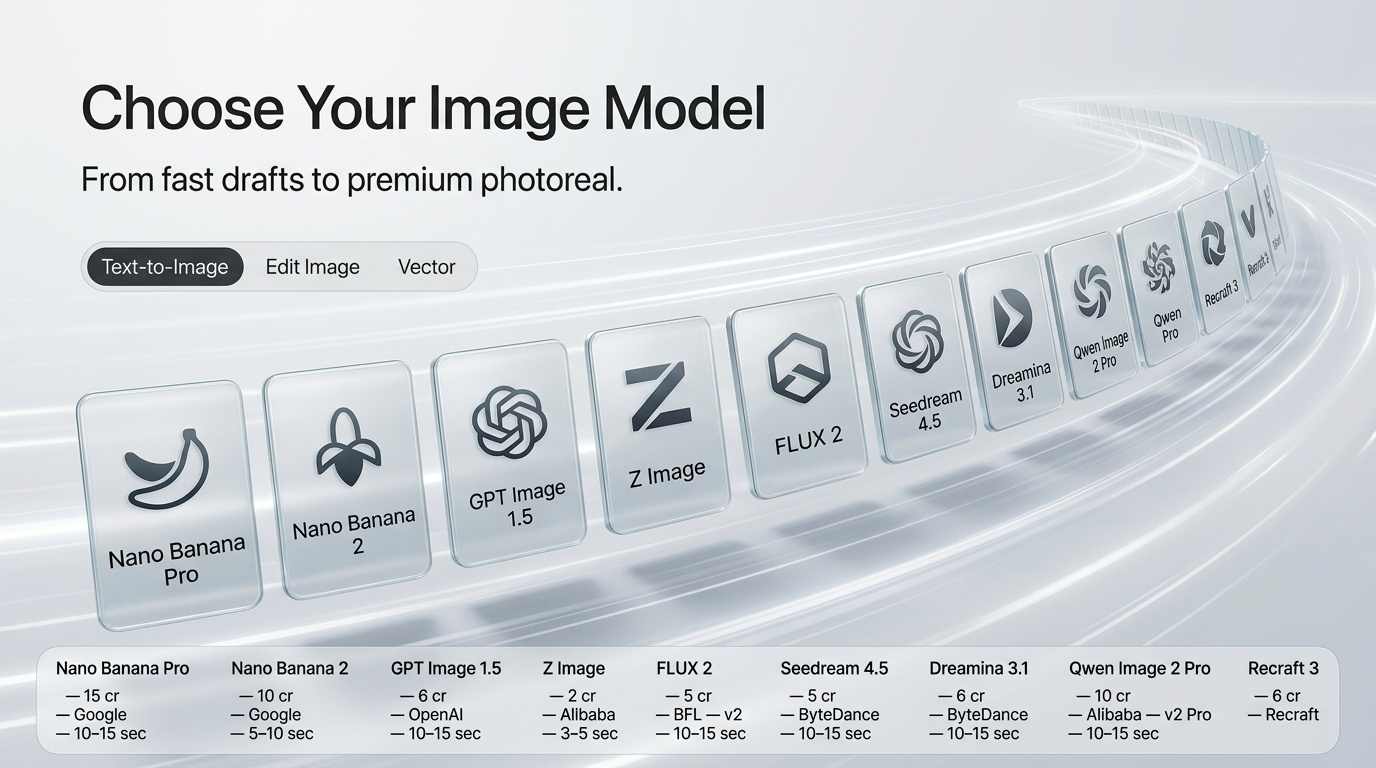
The key is matching the model to your intent. Nano Banana 2 from Google is the default and the best all-rounder at 10 credits for 1K, 15 for 2K and 20 for 4K. Above it, Nano Banana Pro (Gemini 3 Pro) at 15 / 20 / 30 is the flagship — the strongest option on the platform for photorealism, for holding a character's likeness, and for legible text inside an image. Below it, Nano Banana 2 Lite at 6 credits gives you Google quality at 1K only, and Z Image from Tongyi at 2 credits is the cheapest model on the platform and the best value per credit.
From there it becomes a question of house style. OpenAI's GPT Image 2 (3 Low / 8 Medium / 30 High) is the newest OpenAI model here and the best at following complicated, multi-part instructions; GPT Image 1.5 (3 / 6 / 25) is the previous generation. Black Forest Labs' FLUX 2 Pro (8) leads on fine detail and texture for commercial work, with FLUX 2 Flex (6) and FLUX 2 (5) beneath it and FLUX 1 (5) still strong for natural, documentary-style realism — note that FLUX 2 Pro and FLUX 2 Flex generate one image at a time. For art and illustration, ByteDance's Seedream 4.5 (5) and Dreamina 3.1 (6) are the creative picks. Alibaba's Qwen Image 2 Pro (10) is another strong text-in-image option, with Qwen Image 2 (5) as the affordable version. And for brand assets, icons and vector-style design, Recraft 3 (6) ships with a style picker full of curated design styles.
Model
Credits
Best For
Z Image
2
Best value, high-volume realistic looks
Nano Banana 2 Lite
6
Cheap Google quality at 1K
Nano Banana 2
10 / 15 / 20
Platform default, everyday all-rounder
Nano Banana Pro
15 / 20 / 30
Flagship quality, character work, text in images
GPT Image 2
3 / 8 / 30
Complex instructions & compositions
FLUX 2 Pro
8
Fine detail & texture for commercial work
Seedream 4.5
5
Artistic illustration & stylized concepts
Recraft 3
6
Design assets, vector art & icons
Getting started is simple: head to the Image Generator, choose a model, write your prompt, and generate. Prompts are capped around 2,000 characters, an Enhance button will rewrite yours with AI if you want it expanded, and the exact credit cost for your model and resolution is shown before you commit.
From 2-credit drafts on Z Image to flagship output on Nano Banana Pro, the image suite covers every visual style. Nano Banana Pro is the pick for brand-consistent characters and text inside an image, FLUX 2 Pro for fabric and material detail, and Recraft 3 when your design calls for vector-style assets and a curated style picker.
Starting at just 2 credits per image, in any of 11 aspect ratios, 1 to 4 images per run.
Video Generation
AI video generation has reached a breakthrough moment, and Fauxto Labs gives you access to more than twenty of the most powerful models available, covering everything from quick social clips to cinematic short films. Before comparing them, understand the pricing model: video is billed per second on almost every model here, so duration is the dominant cost factor and a 10 second clip costs roughly double a 5 second one. Higher resolutions cost more per second too. The exact total is always shown before you generate.
At the affordable end, Seedance 1.5 Lite is 5 credits per second and reaches 1080p, so a 5 second clip is 25 credits — the cheapest solid option on the platform. LTX 2 is 6 credits per second at 1080p and stretches to 20 second clips, making it the best route to length. Seedance 1.5 Pro at 7 credits per second adds native audio for very little more: 5 seconds with sound comes to 35 credits.
The middle of the range is where most production work lands. VEO 3.1 Lite is 10 credits per second, which is by far the cheapest way to get VEO output. OpenAI's Sora 2 is 12 credits per second — 4 seconds is 48, 8 seconds is 96, 12 seconds is 144 — and is excellent for iterating on physically believable motion. WAN 2.6 is also 12 credits per second at 720p and supports multi-shot sequences. Kling O3 is 14 credits per second, Google's featured Gemini Omni Flash is 15 with native audio you describe in the prompt, and Kling O3 Pro is 18 credits per second at 1080p — so a 5 second Kling O3 Pro clip is 90 credits, and it is arguably the best all-round value for professional motion.
At the premium end, Hailuo 03 is 35 credits per second at 2K, Sora 2 Pro runs 35 to 85 depending on resolution, Kling O3 4K is 50, and Seedance 2.5 is 60 per second at 720p or 150 at 1080p, and is the only model that will do a single 30 second take. VEO 3.1 is the one exception to per-second pricing on the whole platform: it is billed per clip at 225 credits without audio and 338 with, while VEO 3.1 Fast is 120 and 190. Budget for VEO accordingly — a short clip costs the same as a long one.
Model
Credits
Best For
Seedance 1.5 Lite
5/sec
Cheapest solid option, up to 1080p
LTX 2
6/sec at 1080p
Longest clips for the least credits
Seedance 1.5 Pro
7/sec
Cheap cinematic clips with audio
Sora 2
12/sec
Physical realism, fast iteration
Gemini Omni Flash
15/sec
Prompt-driven native audio
Kling O3 Pro
18/sec
Best all-round 1080p value
Seedance 2.5
60/sec at 720p, 150 at 1080p
Single takes up to 30 seconds
VEO 3.1
225–338 per clip
Premium cinematic — priced per clip, not per second
All video models support text-to-video generation and image-to-video for animating a static frame. Several also support first-last-frame, where you supply a start and end image and the model animates between them, and reference-to-video, where you attach reference images, clips or audio so the model matches your subjects and style — that includes the Seedance 2.x family, Hailuo 03, Gemini Omni Flash and the Kling O3 models. Explore the full lineup in the Video Generator, then assemble your clips in the Video Editor, where export costs nothing.
Generate natural-sounding speech with ElevenLabs TTS, create original music with Stable Audio, or clone voices with Minimax. Click a voice to preview.
Janet
Calm, warm narration
Female · American
Sarah
Mature, reassuring, confident
Female · American
Wyatt
Seasoned mentor
Male · American
Tom
Calm, collected authority
Male · American
Helen
Seductive, European tone
Female · Swedish
Evelyn
Pleasant, engaging British
Female · British
Charlie
Deep, confident, energetic
Male · Australian
Voice synthesis starts at 1 credit per 1,000 characters · Music generation at 25 credits per track
Audio & Voice
Great content needs great sound. Fauxto Labs' audio suite covers three core capabilities: music generation, text-to-speech, and voice cloning. Together they let you produce fully finished content — video with narration, ads with voiceovers, podcasts with custom voices — without ever hiring a sound engineer or voice actor.
Stable Audio (25 credits) generates original music tracks in a wide range of genres and moods, and the price is flat regardless of length — a six minute track costs the same 25 credits as a thirty second one. Album mode will produce 3 to 12 tracks in one pass with shared cover art. If you only need a short loop or sting, Google Lyria 2 is the cheaper option at 15 credits for about thirty seconds. On the speech side, Text-to-Speech costs 1 credit per 1,000 characters with a 5,000 character limit per generation, drawing on 50+ ElevenLabs stock voices. And when you need one specific voice — your own or a brand spokesperson — Voice Clone (100 credits) replicates it from an audio sample of at least ten seconds, while Voice Design (also 100 credits) invents a brand new voice from a written description. Both are powered by MiniMax and save into your voice library, where they become selectable in Text-to-Speech, Lipsync and UGC Builder.
Beyond generating from scratch, Fauxto Labs has a set of tools for changing images you already have. Most of the time the answer is the Image Editor, which is the Image Generator with a mode toggle: upload an image or open one from your Library, describe the change, and pick a model. It costs 5 to 30 credits per output image depending on the model and resolution, defaults to Nano Banana 2, and accepts up to 6 reference images (3 on the Qwen edit models). One correction worth noting if you have older bookmarks: the standalone image editing page no longer exists — editing lives inside the Image Generator now.
Character Consistency
Nano Banana Pro in edit mode is the best option on the platform for keeping a character recognizable. Provide a reference image and generate the same character, brand mascot, or product across new poses, scenes and styles at 15 credits for 1K, 20 for 2K and 30 for 4K. Nano Banana 2 does a good job for 10 credits when the likeness only needs to be close. Fauxto Labs does not offer custom model training or LoRA generation of any kind — reference-based editing has replaced that workflow entirely. For a recurring social persona, Influencer Studio handles consistency across a whole content set.
Picking the Right Tool for the Job
Several edits have a dedicated, cheaper tool, and using the general editor for them wastes credits. To change or replace a background, use the Image Editor with Nano Banana 2 or Pro. To remove a background entirely and get a transparent PNG, use Background Remove at 3 credits for an image or 15 for a video. To delete one specific object precisely, mask it in Inpainting at 10 to 20 credits by resolution. To blend several images into one, use Seedream 4.5 (8) in the editor, which is built for multi-input. For style transfer, FLUX Edit (7) is the general option and Ghiblify (8) is the one-click anime route.
The rest are single-purpose and priced accordingly: Upscale is 5 credits per image and 55 per video, Reframe extends an image into a new aspect ratio for 6 credits (55 for video), Fashion Try-On puts a garment on a model for 10 credits per image, and Realtime Sketch turns a rough drawing into a finished image for 10.
Task
Credits
Use This
Character consistency & new poses
15–30
Image Editor with Nano Banana Pro
Change or modify a background
10–30
Image Editor with Nano Banana 2 or Pro
Remove a background only
3 image / 15 video
Background Remove
Remove a specific object
10–20
Inpainting
Blend several images together
8
Image Editor with Seedream 4.5
Style transfer
7, or 8 for anime
FLUX Edit, or Ghiblify
Resolution enhancement
5 image / 55 video
Upscale
Aspect ratio change
6 image / 55 video
Reframe
Try on clothing
10 per image
Fashion Try-On
Sketch to image
10
Realtime Sketch
Specialized Studios
Beyond the individual model pages, The Lab holds a set of guided, multi-step tools that chain several models together for one outcome. Where a tool page gives you direct control over a single model, a Lab tool takes a goal — an ad, a review video, a lookbook — and handles the sequencing. Here are the ones most people reach for first.
Influencer Studio
Create virtual influencers for your brand. Pick from 36+ preset AI characters or supply your own, choose a content type — selfies, mirror shots, gym, travel, lifestyle, fashion, product placement — and generate a consistent set of social photos on Nano Banana Pro Edit at 15 credits per image at 1K. Album mode generates a whole batch of scenes in one run, and content sets are named and saved. Explore it at Influencer Studio.
UGC Builder
Generate creator-style product content at scale. Pick a product, an AI creator, a location, a camera mode and a voice, and the UGC Builder writes the script, builds the scenes, records the voiceover and produces the talking video. It runs in three modes — product review, talking video and product B-roll — with approval steps between stages. Scene images are 7 credits standard or 15 / 20 / 30 on Pro at 1K / 2K / 4K, and the video step is lipsync at 10 credits per second of audio, or a VEO 3.1 clip if you want the premium look. Try it at UGC Builder.
Photoshoot
Expand a single photo into a full set without a studio, model or equipment. Upload one reference image and Photoshoot returns up to 9 variations — different angles, multishot sequences, zooms, lighting setups, a reimagined environment or a reimagined subject — at 10 / 15 / 20 credits per variation at 1K / 2K / 4K, or 15 / 20 / 30 on the Pro setting. Results stream in as they finish. Get started at Photoshoot.
Ad Creator
Turn product photos into finished ads. Upload 1 to 8 images plus an optional logo and ad copy, pick from 80+ ad style presets, and AI writes the concept and generates the creative — 10 / 15 / 20 credits per image on Nano Banana 2 at 1K / 2K / 4K, or 15 / 20 / 30 on Nano Banana Pro. There is a follow-up step that turns any finished ad into video. Visit Ad Creator to start generating.
Marketing Room and Video Agent
Two more worth knowing when the deliverable is video rather than stills. Marketing Room takes product photos and optional reference clips, has AI direct the spot, and returns a finished ad — the cost is your chosen Seedance rate times the duration, so an 8 second spot on Seedance 2.0 at 35 credits per second is 280. Video Agent goes further: give it a topic and it researches, scripts, generates visuals, records the voiceover and renders a complete long-form video, from 80 credits for 30 seconds up to 280 for three minutes, with animation adding 50 percent.
Sign up for free and receive 20 credits to explore our tools. No credit card required. The Image Generator loads Nano Banana 2 by default at 10 credits for a 1K image, and Z Image at 2 credits is the cheapest model on the platform if you want to stretch those first 20 credits as far as possible.
What's the best tool for beginners?
Start with the Image Generator on its default model, Nano Banana 2 (10 credits at 1K, 15 at 2K, 20 at 4K). It is sharp, follows prompts well, and is the best all-round balance of price and quality. Drop to Z Image (2 credits) or Nano Banana 2 Lite (6 credits) while you are experimenting. Once you are comfortable, try video — Seedance 1.5 Lite is 5 credits per second, so a 5 second clip is 25 — or a guided Lab tool like Photoshoot or Influencer Studio.
Can I use generated content commercially?
Yes! All content generated on Fauxto Labs includes full commercial rights. Use it for marketing, products, advertisements, social media, and any business purpose without attribution or additional licensing.
How does the credit system work?
Credits are our universal currency. Each tool costs a specific number of credits per generation, and the exact cost is shown before you generate. New accounts start with 100 free credits. Credits never expire, and unused ones roll over — a renewal adds to your balance rather than resetting it.
Start Creating Today
Access all AI content creation tools in one platform. No subscriptions — just pay for what you use. 100 free credits to start, no credit card required, and full commercial rights on everything you generate.